Hi all, i want to prefilter a module and want to check if there are tables included. Therefore i wrote following lines: Module m = current int iACC = 0, iREJ = 0 filtering off showTables false Filter filTableTyp = (attribute "TableType" == "TableBase") set(m, filTableTyp, iACC, iREJ) ancestors false filtering on print "Table count: " iACC "\n" But this always returns nothing found. I am also not able to choose the "TableType" attribute in the build in module filter. Does anyone know how to check if there is a table inside a module without using for-loop and checking each object for table(o)? Thanks in advance leporello - Wed Apr 15 03:51:30 EDT 2015 |
Re: Filtering on table header Hello First you should know that a table contains some invisible objects. This you can only find by looping through the entire object set.
Object objWork;
for objWork in entire(mdlWork) do {
    // ...
}
Second: Yes you cannot filter based on this property neither in the gui nor in the dxl code. You can try to use accept or reject to put the objects into the filter or from it. Best regards Wolfgang
|
Re: Filtering on table header If I insert a filterTables(false) or check the checkbox in the filter dialog to also filter table cells, then the filter works as intended. However the accepted count does not work. Regards, Mathias |
Re: Filtering on table header Hello, thank you for your hints! The accept/reject solution was also in my mind but for this i have to iterate over all the objects in the modules. But regarding the runtime, that solution i only wanted to use in worst case. I apply a prefilter with filterTables(false) now and then loop through the filtered objects to count and process the tables.
Anyway appreciate your help :)) Thx |
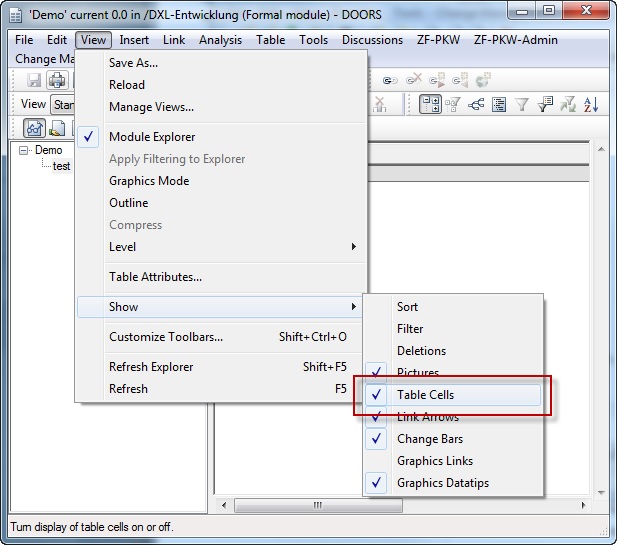
Re: Filtering on table header Mathias Mamsch - Wed Apr 15 10:43:48 EDT 2015 If I insert a filterTables(false) or check the checkbox in the filter dialog to also filter table cells, then the filter works as intended. However the accepted count does not work. Regards, Mathias Ups you are right, but this command is not a filter command. This command represents one of the options "View-Show". Attachments TableCells.jpg |